Japan Rakuten Travel Promo Codes, Latest Discounts, and Booking Tutorial
Japan’s Rakuten Travel is the largest online travel platform in Japan, offering services such as hotel reservations, car rentals, and purchasing express bus tickets. In addition to the Japanese website, Rakuten Travel also has an overseas version with Chinese and English interfaces. Currently, while the Japanese website regularly hosts promotional events and distributes discount coupons, the overseas version also frequently offers promo codes.

Table of Contents
Latest Rakuten Travel Promo Codes and Deals for October 2026
Rakuten Travel Japan regularly issues various discount coupons and promo codes, and the overseas version of Rakuten Travel also offers various booking promo codes. Below is a summary of the latest promotional offers from Rakuten Travel. Note that whether you use the Japanese site or the overseas site, you can only use coupons or promo codes if you book as a member.
1. Overseas Rakuten Travel Promo Codes and Deals
In recent years, the overseas version of Rakuten Travel has taken a more aggressive approach to promotions in order to compete for overseas customers, so the overseas Rakuten Travel site now also offers various discount coupons and promo codes, with higher discount rates than the Japanese site.
Below is a summary of the latest Rakuten Travel promotions and promo code information. See the details below for more.
- Autumn/Winter Travel Season【🔗 Campaign page】
- ✅ Offers 20% off (up to JPY20,000 off), 15% off (up to JPY15,000 off), and 8% off (up to JPY8,000 off) coupons. Each member can use each type once only. Valid for stays at designated hotels on or before September 30, 2027.
- 📆 October 1, 2026, 10:00 – October 20, 09:59 (Japan time)
- VISA Credit Card Up to 8% Off Promo Codes【🔗 Campaign page】
- ✅ Use a VISA credit card issued in designated regions to book Japanese hotels for stays on or before December 31, 2027, and enjoy: 8% off exclusively in the mobile app (“VISAGLOBAL8”, up to JPY10,000 off) and 5% off for both web/app (“VISAGLOBAL5”, up to JPY8,000 off).
- 📆 From now until December 1, 2026
- Hong Kong Citi Credit Card HK$100 Promo Code【🔗 Campaign page】
- ✅ Use a Citi credit card issued in Hong Kong to book Japanese hotels for stays on or before December 31, 2027. Get HK$100 off orders of HK$1,000 or more.
- 📆 From now until December 1, 2026
- Member 5% Off Coupon【🔗 Campaign page】
- ✅ Member monthly 5% off coupon, updated monthly, valid until the beginning of the following month, applicable to stays on or before December 31, 2026.
- 📆 Updated monthly (see campaign page for details)
- New User 5% Off Coupon【🔗 Campaign page】
- ✅ New members get 5% off their first booking, applicable to stays on or before June 30, 2027.
- 📆 From now until January 31, 2027
How to Use Rakuten Travel Promo Codes
Using a Rakuten Travel promo code involves two steps:
- On the campaign page, click the image showing the promo code details to claim the coupon;
- When booking a hotel, select the coupon to use on the checkout page. (⚠ The system generally does not apply coupons automatically; you need to select them manually.)
1. Autumn/Winter Travel Season
The overseas Rakuten Travel site is holding the “Autumn/Winter Travel Season” promotion from October 1, 2026, 10:00 to October 20, 09:59 (Japan time). During the promotion, limited-time special accommodation plans at designated hotels will be offered, along with several high-discount coupons, including:
- 20% off coupon: up to JPY20,000 off
- 15% off coupon: up to JPY15,000 off
- 8% off coupon: up to JPY8,000 off
⚠ Each member can use each type of coupon only once, and the stay date must be on or before September 30, 2027.
2. VISA Credit Card Up to 8% Off Promo Codes
Before December 1, 2026, you can get promo codes through this VISA credit card offer page. Use a VISA credit card issued in Hong Kong, Taiwan, Singapore, Malaysia, the Philippines, Thailand, Indonesia, South Korea, Australia, or the UK to book Japanese hotels for stays on or before December 31, 2027, and enjoy 8% or 5% off.
- 8% off promo code: “VISAGLOBAL8”, no minimum spend, up to JPY10,000 off, but only usable in the mobile app.
- 5% off promo code: “VISAGLOBAL5”, no minimum spend, up to JPY8,000 off, usable on both the website and mobile app.
3. Hong Kong Citi Credit Card HK$100 Promo Code
Before December 1, 2026, you can get a promo code through this Citi credit card offer page. Use a Citi credit card issued in Hong Kong to book Japanese hotels for stays on or before December 31, 2027, and get HK$100 off orders of HK$1,000 or more.
4. Member 5% Off Coupon
Rakuten members can get a 5% off coupon through this 5% off offer page. The coupon is updated monthly, valid until the beginning of the following month, and can be used to book hotel stays on or before December 31, 2026.
5. New User 5% Off Coupon
Before January 31, 2027, get a coupon through this new user offer page and enjoy 5% off your first hotel booking, with stay dates through June 30, 2027.
2. Japanese Domestic Site Coupons and Deal Information
Rakuten discount coupons (RaCoupon) “ラ・クーポン” are discount coupons provided by Rakuten Travel Japan (Japanese site) to members, and can be used to deduct amounts payable when booking accommodations, renting cars, or purchasing bus and plane tickets.
Coupons are provided by different organizations, including coupons provided by Rakuten, coupons provided by accommodation facilities (hotels), coupons provided by local governments, and coupons provided by central or local governments, among others.
Coupons provided by different organizations can generally be combined (stacked), but some cannot be combined. Coupons that can be combined are marked “併用可”, while those that cannot be combined are marked “併用不可”. If they can be combined, a maximum of three coupons may be used together, and the three coupons must be provided by different organizations.
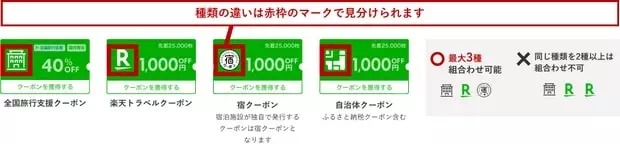
When downloading a coupon, you will see a line of text at the bottom of the coupon indicating the organization providing it. For example, coupons provided by Rakuten are marked with the words “楽天トラベルクーポン“, while coupons provided by accommodation facilities are marked with the words “宿クーポン“.
Coupons are not usable at all hotels; they usually apply only to hotels participating in the coupon promotion. Depending on the eligible targets, RaCoupon has several different types, mainly including:
- 1. Nationwide general-purpose coupons
- Applicable to most Japanese domestic hotels on the site where coupons can be used. These coupons are usually issued by Rakuten during large-scale promotions, such as Rakuten Travel Super Sale.
- 2. Regional general-purpose coupons
- Applicable only to hotels within a certain region on the site (for example, the Kinki region) where coupons can be used. These coupons are usually issued by local governments in specific regions to promote tourism.
- 3. Promotion general-purpose coupons
- Applicable only to hotels participating in a certain promotion on the site. These coupons are usually provided by hotels participating in a specific promotion, such as coupons issued by luxury hotels and hot spring ryokan on days ending in 0 or 5.
- 4. Single-hotel coupons
- The most common type of RaCoupon is a coupon applicable to only one hotel. The discount amount, usage conditions, and expiration date of each hotel’s coupon differ, and not all hotels issue coupons. These coupons can usually only be used to book certain designated accommodation plans offered by the hotel, though some can be used for all of the hotel’s accommodation plans.
Below is a summary of the latest promotional campaigns and coupon information on the Rakuten Travel Japanese site. See the details below for more.
- Kyushu Recovery Support Discount (九州ふっこう応援割)【🔗 Campaign page】
- ✅ 60% off stays in Kumamoto and Kagoshima / 50% off stays in other Kyushu prefectures. Can be used to book Kyushu hotels for stays from October 1 to December 25, 2027.
- 📆 Released in stages from September 15, 2026, 10:00 (Japan time); release times differ by prefecture.
- Rakuten Travel Autumn Sale (楽天トラベル オータムSALE)【🔗 Campaign page】
- ✅ Discounted hotel accommodation plans + various coupons. Stacking different coupons can get up to 30% off. Can be used to book Japanese hotels for stays on or before September 30, 2027.
- 📆 October 1, 2026, 10:00 to October 20, 9:59 (Japan time)
- Rakuten Travel Coupon Festival (楽天トラベルお得なクーポン祭)【🔗 Campaign page】
- ✅ Diamond member ¥4,500 coupon, Diamond and Platinum member ¥3,000 coupon, regular member ¥500 coupon. Can be used to book Japanese hotels for stays on or before September 30, 2027.
- 📆 From now until November 4, 2026, 9:59 (Japan time)
- Luxury Hotels and Hot Spring Ryokan Up to 20% Off Coupons【🔗 Campaign page】
- ✅ Book a luxury hotel or hot spring ryokan, and if the order amount is ¥35,000 or more, you can use the “5th and 0th day coupon” to get up to 20% off.
- 📆 The 5th, 10th, 15th, 20th, 25th, and 30th of each month
- Sapporo Designated Hotel ¥5,000 Coupon【🔗 Campaign page】
- ✅ Book a Sapporo hotel for stays on or before November 30, 2026, and get ¥5,000 off orders of ¥30,000 or more.
- 📆 From now until November 29, 2026, 23:59 (Japan time)
- Abashiri Hotel Up to ¥3,000 Coupon【🔗 Campaign page】
- ✅ Book an Abashiri, Hokkaido hotel for stays from October 20, 2026 to January 19, 2027, and get ¥3,000 off orders of ¥18,000 or more, ¥2,000 off orders of ¥10,000 or more, and ¥1,000 off orders of ¥6,000 or more.
- 📆 From now until November 29, 2026, 23:59 (Japan time)
- Kumamoto・Kagoshima Tourism Support Coupons【🔗 Campaign page】
- ✅ Offers 5% OFF at designated accommodations.
- 📆 From now until October 31, 2026, 23:59 (Japan time)
- Noto Peninsula Support Coupons【🔗 Campaign page】
- ✅ Offers 5% OFF at designated accommodations.
- 📆 From now until January 1, 2027, 9:59 (Japan time)
AD

1. Rakuten Travel Autumn Sale (楽天トラベル オータムSALE)
Rakuten Travel Japan is holding the “Rakuten Travel Autumn Sale (楽天トラベル オータムSALE)” major promotion from October 1, 2026, 10:00 to October 20, 9:59 (Japan time). The offers include:
- Hotel stays at up to more than half price;
- Special car rental plans;
- Discounted highway bus tickets;
- Large-value or high-discount coupons for hotels, car rentals, and highway buses.
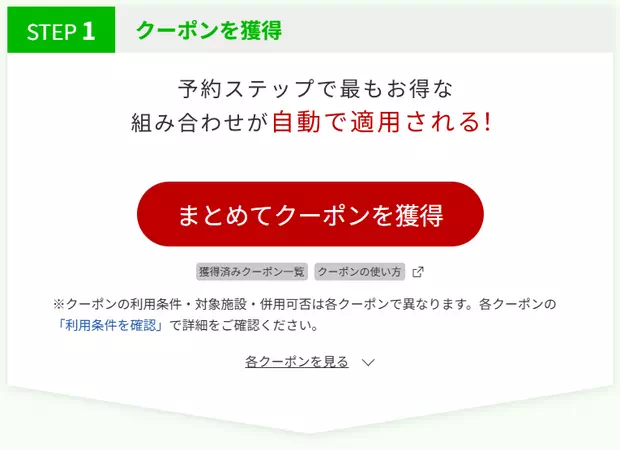
During the Rakuten Travel Autumn Sale, multiple accommodation coupons of different values and discount rates will be issued. The coupons fall into two categories: one issued by accommodation facilities (coupons with the word “宿クーポン”), and the other issued by Rakuten Travel (coupons with the word “楽天トラベルクーポン”). The two types of coupons can be used together, but note that different coupons are used at different times. All coupons can be downloaded on this page. After entering the page, click the red “まとめてクーポンを獲得” button in Step 1 in the image below to download all coupons.
2. Rakuten Travel Coupon Festival (楽天トラベルお得なクーポン祭)
Rakuten Travel released the latest October 2026 Coupon Festival (楽天トラベルお得なクーポン祭) coupons on October 2, 2026. This time, fixed-amount coupons were released, with seven different coupon values for different member tiers. The coupons can be downloaded from the Coupon Festival page.
- ¥4,500 coupon – Diamond members only, valid on Fridays and Saturdays, usable for transactions of ¥40,000 or more;
- ¥4,000 coupon – Diamond members only, valid Sunday–Thursday, usable for transactions of ¥35,000 or more;
- ¥3,000 coupon – Diamond and Platinum members only, valid on Fridays and Saturdays, usable for transactions of ¥25,000 or more;
- ¥2,500 coupon – Diamond and Platinum members only, valid Sunday–Thursday, usable for transactions of ¥20,000 or more;
- ¥1,500 coupon – Diamond and Platinum members only, valid on Fridays and Saturdays, usable for transactions of ¥12,000 or more;
- ¥1,000 coupon – Diamond and Platinum members only, valid Sunday–Thursday, usable for transactions of ¥8,000 or more;
- ¥500 coupon – Available to all members, with no usage conditions.
The above coupons are valid from October 2, 2026, 10:00 to November 4, 9:59 (Japan time), and can be used to book Japanese hotel stays from October 2, 2026 to September 30, 2027, though certain dates are excluded.
Coupon Festival coupons are issued by accommodation facilities, so they can be combined with coupons issued by Rakuten Travel or local governments, such as the 10% and 5% coupons for luxury hotels and hot spring ryokan issued by Rakuten on the 5th, 10th, 15th, 20th, 25th, and 30th of each month.
3. Luxury Hotels and Hot Spring Ryokan Up to 20% Off Coupons
Book a luxury hotel or hot spring ryokan on the 5th, 10th, 15th, 20th, 25th, and 30th of each month, and if the order amount is ¥35,000 or more, you can use the “5th and 0th day coupon” to get up to 20% off. The coupons can be downloaded from the 0 and 5 offer page.
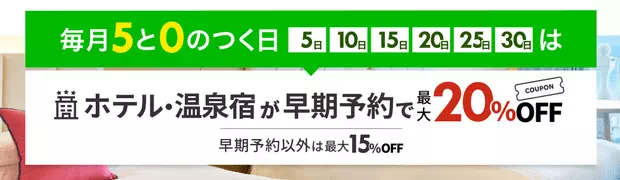
The “5th and 0th day coupon” includes two types of coupons. The first type is provided by hotels and hot spring ryokan (accommodation facilities). This type is further divided into two kinds: one is limited to the highest-class hotels (about 100 properties), with a 10% discount rate and a maximum discount of ¥12,000; the other can be used at luxury hotels and hot spring ryokan (about 1,600 properties), also with a 10% discount rate, but with a maximum discount of only ¥5,000.
The second type is provided by Rakuten. This type is also divided into two kinds: one is limited to the highest-class hotels (about 230 properties), with a 10% discount rate; the other can be used at luxury hotels and hot spring ryokan (about 8,400 properties), but with a discount rate of only 5%.
These two types of coupons can be used together. If you book a highest-class hotel eligible for the coupons, you can get up to 20% off. If you book a general luxury hotel or hot spring ryokan, you can get up to 15% off. The coupons can be downloaded from the 0 and 5 offer page. In addition, on the coupon download page, you can also view the list of hotels and hot spring ryokan eligible for the coupons.
As many as 200,000 “5th and 0th day coupons” are available each time, so they basically never run out. If the hotel or hot spring ryokan you plan to book is eligible for the “5th and 0th day coupon” and your order amount will exceed ¥35,000, it is recommended to book on the 5th, 10th, 15th, 20th, 25th, or 30th of the month whenever possible.
4. Single-Hotel Coupons
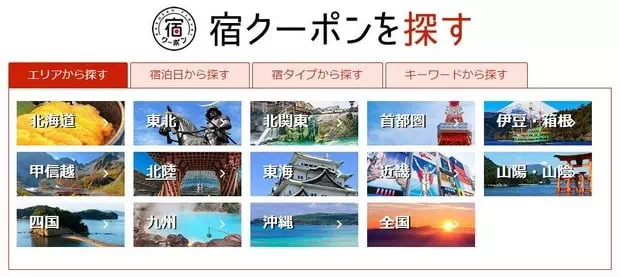
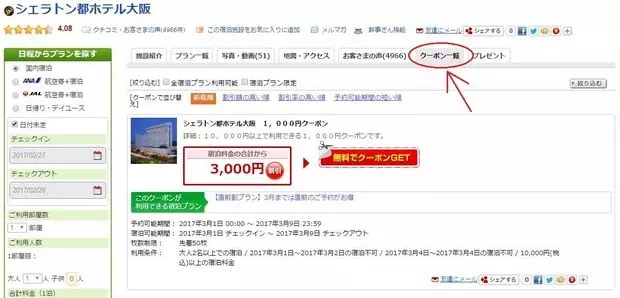
In addition to general-purpose coupons usable at most hotels, many hotels also offer coupons applicable only to a single hotel. To find out which hotels offer their own discount coupons, you can search by region on this hotel offers page. In addition, on a hotel’s page on the site, you can also find the coupons offered by that hotel (if any) under the “クーポン一覧” tab.
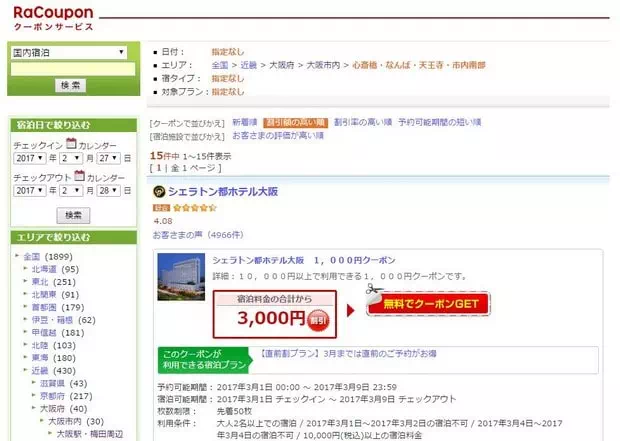
Also, if a hotel offers its own discount coupons, you will see them under the “クーポン一覧” tab on the hotel page.
Below, taking the coupons shown on the page for Hotel Sunroute Plaza Shinjuku in Shinjuku, Tokyo as an example, the meaning of each part of each discount coupon is explained.
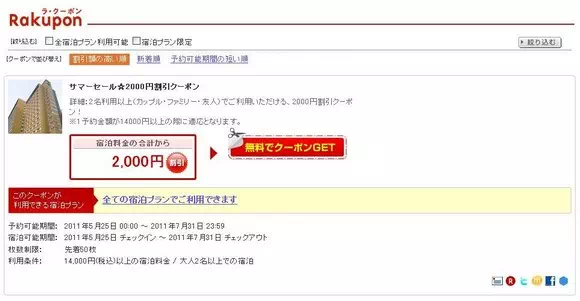
| (1) | サマーセール☆2000円割引クーポン | This is the coupon name, below which is a brief introduction to the coupon details. |
| (2) | 宿泊料金の合計から | Discount amount |
| (3) | このクーポンが利用できる宿泊プラン | Accommodation plans eligible for the coupon. “全ての宿泊プランでご利用できます” means it applies to all accommodation plans. If it applies only to designated accommodation plans, the names and links of those plans will be shown here. |
| (3) | 予約可能期間 | Booking period for using the coupon |
| (4) | 宿泊可能期間 | Stay period for using the coupon |
| (5) | 枚数制限 | Coupon quantity limit |
| (6) | 利用条件 | Usage conditions. In this example, the conditions include: accommodation fee of ¥14,000 or more and a minimum of two guests. |
5. High-Value Discount Coupons for Specific Regions
To revitalize tourism in certain areas hit by natural disasters or other factors, sometimes some cities or prefectures offer high-value accommodation discount coupons. Using these coupons can get a much higher discount rate than normal, but these coupons generally run out quickly, so when you know they are being released, be sure to use them as soon as possible. These coupons can be downloaded from this regional offers page.
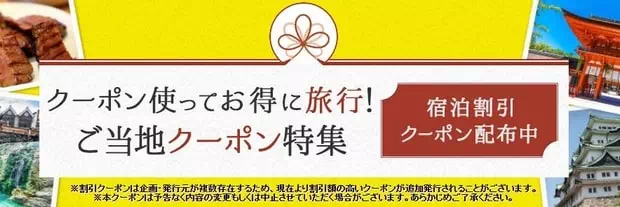
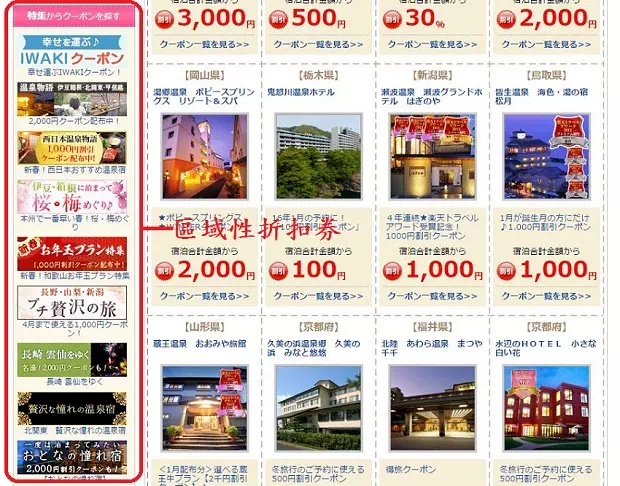
6. Regional/Special Discount Coupons
In addition to general coupons applicable to hotels across Japan participating in the promotion, there are also regional or special coupons (such as coupons offered by hotel chain groups or region-limited discount coupons). These coupons can be found on the RaCoupon discount coupon page under “特集からクーポンを探す” on the left side. (Note: it has now been moved to a position near the bottom of the page.)
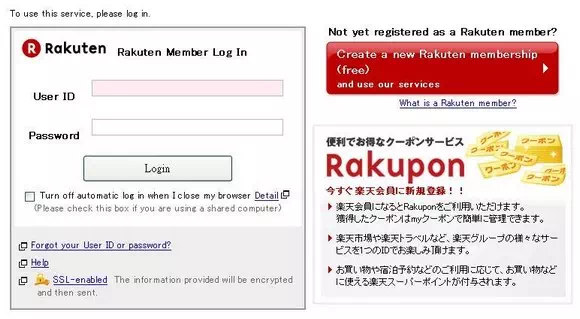
How to Claim Coupons
If you want to use a coupon when booking a hotel, you first need to download the coupon to your membership account. To download a coupon, press the coupon image or the red “無料でクーポンGET” button. If you are not logged in to your membership account, the system will first take you to the login page. After entering the correct member ID and password and logging in, you can download the coupon to your membership account.
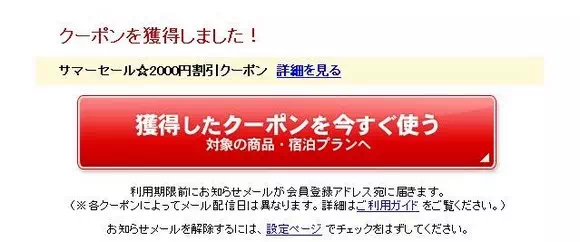
All downloaded coupons will be displayed on the myCoupon page of your membership account.
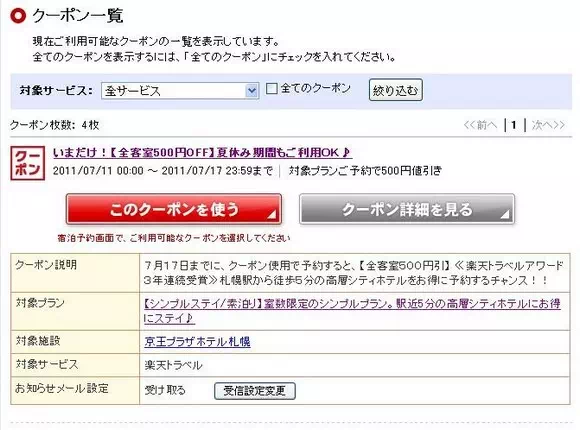
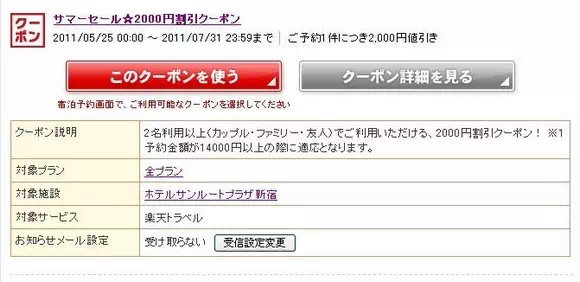
After downloading a coupon, if your order meets the conditions for using the coupon when booking, you can select the coupon to use from the coupon menu.
Notes:
- Coupons and promo codes apply only to hotels participating in the promotion.
- To use coupons and promo codes, you must first register as a Rakuten member.
- For information on how to use coupons, please refer to the relevant section in the booking tutorial below.
Rakuten Travel Japanese Website Booking Tutorial
The downside of Rakuten Travel is that it’s a Japanese-language website, but this isn’t a major issue. Just follow the tutorial below to complete your booking easily.

While Rakuten Travel now has an overseas version, the Japanese website offers more hotels and often better prices. However, when the overseas version has promotions or better promo codes, it may be cheaper.
The booking tutorial for the Japanese website is divided into seven parts:
- Part 1: Registering a Member Account
- Part 2: Searching for Hotels
- Part 3: Viewing Hotel Information
- Part 4: Understanding Accommodation Plan Details
- Part 5: Making a Reservation
- Part 6: Canceling a Reservation
1. Registering a Member Account
You don’t need to register as a member to book on Rakuten Travel, but doing so offers at least two benefits:
- First, after completing your stay, you’ll earn Rakuten Points worth at least 1% of the room rate, which can be used for future bookings (1 point = 1 JPY).
- Second, Rakuten Travel frequently offers member-exclusive promotions, coupons, and discount codes.
Thus, registering as a member before booking is more advantageous.
The member registration page is available in Japanese and English. Since the English interface is straightforward, here’s a brief overview.
1. On the homepage’s right sidebar, click the “無料会員登録” link. (Click here to go directly to the registration page)

2. Click the red “Member Registration (Free)” button in the middle of the registration page.

3. Fill in the required information, including:
Email address
User ID
Password
Name
Date of Birth
Gender
Postal Code (For addresses outside Japan, you can enter 000-0000)
Prefecture (For addresses outside Japan, select “Other (Overseas)”)
City/Ward
Street Address (Now referred to as “Rest of Address”)
Telephone Number


【Note】: Fields marked with “Required” in red must be filled out; others are optional. If you have questions, click “Detailed help” next to the field for assistance.
4. After entering all the information, click the “Agree to the Following Terms & Conditions and Confirm the Information Entered” button [now changed to Next Step].
5. Review the entered information for accuracy. To make changes, click the “<< Return to previous page and make changes” button. If everything is correct, click the “Register Rakuten Membership” button to complete the registration.


6. Membership registration is now complete.

The screen above indicates that you have successfully registered as a Rakuten member. At the same time, the system will send a confirmation email to your registered email address. (Update: It seems confirmation emails are no longer sent.)

How to Update Rakuten Member Information?
To update your Rakuten member information, such as phone number, address, email, or adding credit card details, follow these steps:
1. On the homepage, click the “Login” link in the right sidebar to access your member account.

2. After logging in, the right sidebar will display basic account information. Click the “Member Registration Information/Change” link.

3. Enter your User ID and password, then click the “Proceed to Next Step” button to log in.

4. Click the “Rakuten Member Information Management” link to go to the member information management page.

5. If your location is outside Japan, the system will automatically switch to the English version of the member information management page. To update specific information, click the “Confirm/Change” button under the relevant item.

6. Click the “Change” button.

7. After filling in the updated information, click the “Agree to the Following Terms & Conditions and Confirm Changes” button.

8. Enter your account password, then click the “Update . . . . . . Information” button to confirm the changes.

II. Searching for Hotels
The website provides two main methods for searching hotels. One is to use the search bar on the left side of the homepage to set conditions such as stay dates, location (prefecture), number of rooms, and number of guests. The other is to select a location via the map and then set the stay dates, number of rooms, and number of guests. Additionally, if you want to search for hot spring ryokans in Japan, you can click the “Hot Spring” button below the map on the homepage.

(1) Search hotels by map location
(2) Search hotels by directly setting stay dates, number of guests, location, etc.
(3) Search for hot spring ryokans
Here, we will mainly explain how to search for hotels by selecting a location on the map.
1. On the homepage, hover over the region where you plan to stay (e.g., Tokai), then select the prefecture of your destination (e.g., Aichi) from the list that appears.

2. On the prefecture page, select the city or area where you plan to stay (e.g., Nagoya).

3. On the city page, select the district where you plan to stay (e.g., Nagoya Station, Fushimi, Marunouchi). (Note: The hierarchy of divisions may vary by region.)

4. In the search bar on the left, set the stay dates, number of rooms, number of guests per room, and other conditions, then click the “Search” button to find hotels that meet your criteria.

(1) Check-in date
(2) Check-out date
(3) Number of rooms
(4) Number of guests per room
Note 1: If needed, you can set the upper and lower limits for the total cost (including tax) per room per night in the “Total Price” section above the “Search” button.
Note 2: If the number of rooms is set to more than one, the system will assume all rooms are of the same type (e.g., all Double or all Twin). If you need to book different room types, such as one Double and one Twin, you will need to search and book them separately.
Note 3: In the search bar, you can set the following search conditions:
- “Domestic Stay” – Search for hotels in Japan (including ryokans and guesthouses)
- “Day Use” – Search for day-use hot springs or hourly hotels
- “Check-in” – Check-in date
- “Check-out” – Check-out date
- “Number of Rooms” – Number of rooms
- “Number of Guests per Room” – Number of guests per room
【Tip】:If your group includes children, when setting the number of guests per room, adjust based on the children’s ages:
- Upper elementary school students – Generally ages 9 to 11
- Lower elementary school students – Generally ages 6 to 8
- Infants (with meals and bedding) – Children under 6 requiring meals and bedding
- Infants (meals only) – Children under 6 requiring meals but no bedding
- Infants (bedding only) – Children under 6 requiring bedding but no meals
- Infants (no meals or bedding) – Children under 6 requiring neither meals nor bedding
Children aged 12 or older are counted as adults.

5. After completing the search, the page will display a list of hotels and accommodation plans that meet your criteria in table form. To view detailed information about a hotel, click the hotel name or image to go to the hotel’s page (see the next step “Viewing Hotel Information“).

(1) Sorting options
(2) Number of hotels matching your criteria
(3) Total price for one room for the entire stay (excluding tax)
(4) Smoking or non-smoking room
(5) Payment method
(6) Room type, size, and amenities
(7) Whether breakfast and dinner are included
(8) Indicates a 1,000 yen discount coupon is available for this plan
(9) View other accommodation plans
(10) Remaining rooms
(11) Book now
Note 1: The hotel list can be sorted in different orders, such as by recommended hotels (Recommended), price low to high (Price (Low to High)), price high to low (Price (High to Low)), guest rating high to low (Rating (High to Low)), or room size large to small (Room Size (Large to Small)). It is recommended to sort by guest ratings and then consider quality, price, and location when choosing a hotel. (Note: Sometimes the page will display a few recommended hotels (ads) at the top.)
Note 2: In the search results, each hotel will display up to three accommodation plans. If you find a plan that meets your requirements and want to book it directly, click the red “Book” button (see the “Booking” section for details). To view other plans, click “View All Available Plans“.
Note 3: When fewer than 10 rooms are available, the “Book” button will display the remaining number, e.g., “Only 5 rooms left!” If no number is shown, it means 10 or more rooms are available.
Note 4: The price shown in the search results is the total price for one room for the entire stay. For example, if staying for 3 nights, this price is for all 3 nights. Additionally, the displayed price includes consumption tax (Tax Included). (Note: Previously, prices were displayed without tax (Tax Excluded). The screenshot above is from the past, so the price is labeled Tax Excluded.)
Note 5: Below the price in the accommodation plan, the accepted payment methods will be displayed. Typically, these include Online Card Payment (previously labeled “Credit Card”) and Payment at Hotel (can be paid in cash or by credit card at check-in, previously labeled “Cash”). Note that payment methods may vary by plan. If the plan only accepts online card payment, you must pay by credit card immediately when booking. Be sure to check the cancellation policy in the plan details. Some premium hotels offer special plans that only accept online credit card payment and may not allow cancellations or refunds, so look for terms like No Changes or Cancellations.
Note 6: If a green “XXXX yen Discount Coupon Available, Total XXXXX yen (Tax Included)!” label appears below the price in the plan, it means a discount coupon is available for this plan. You can click the link to download the coupon.
Note 7: To further narrow your search, you can add filters (by checking the relevant boxes) on the search results page, such as specifying room type, including breakfast or dinner, etc., then click the “Refine” button.

Filters available on the hotel search results page include:
- “Single” – Single Room
- “Semi-Double” – Semi-Double Room (small double bed)
- “Double” – Double Room (one large bed)
- “Twin” – Twin Room (two beds)
- “Triple” – Triple Room
- “Japanese-Style Room” – Traditional tatami room
- “Japanese-Western Room” – Mixed Japanese and Western style
- “Breakfast Included” – Includes breakfast
- “Dinner Included” – Includes dinner
- “Public Bath” – Hotel has a bathhouse
- “Credit Card Payment” – Accepts credit cards
- “Non-Smoking Room” – Non-smoking room
- “Internet Access” – Internet available
- “Room with Open-Air Bath” – Room includes a private outdoor hot spring
Note 8: When searching for hotels in a specific area, there is only one setting for the number of guests per room. If booking multiple rooms with different guest counts, first set the maximum number of guests per room. For example, if booking two rooms—one for 2 guests and one for 1 guest—set the number of guests per room to 2 here. Then, on the hotel’s page, you can adjust the guest count for each room separately, as the search bar on the hotel page allows individual settings for each room.
Note 9: In addition to displaying matching hotels in a list, you can click “Show on Map” to switch to a map view. The numbers on the map correspond to the order of the hotel list.

III. Viewing Hotel Information
In the previous section, the search system only displays basic information about hotels and accommodation plans that meet your criteria. To learn more about a hotel or the details of an accommodation plan, you’ll need to visit the hotel’s dedicated page on the website.
Below, we’ll use Nagoya JR Gate Tower Hotel (名古屋JRゲートタワーホテル) as an example to explain how to view hotel information. The next section (Part IV) will cover how to view accommodation plan details.

Each hotel’s page on Rakuten typically includes tabs such as “施設紹介” (hotel facilities), “プラン一覧” (accommodation plans), “写真・動画” (photos and videos), “地図・アクセス” (location and access), “お客さまの声” (guest reviews), and “クーポン覧” (coupons). Larger hotels provide more detailed information, while smaller ones may only offer basic details.
The “施設紹介” tab contains the hotel’s basic information, such as address, phone number, transportation, parking facilities and fees, total number of rooms, in-room amenities, internet access, cancellation policies, and check-in/check-out times.

The “プラン一覧” tab displays all available accommodation plans for booking. For details, refer to Part IV.
The “写真・動画” tab provides photos of the hotel. Some hotels also offer 360-degree photos or videos, allowing you to preview the building, decor, rooms, hot springs, etc.

However, these photos are provided by the hotel and naturally highlight its best features. To see real photos, it’s best to refer to those uploaded by guests. Many people share detailed reviews and photos of hotels they’ve stayed in on blogs, but finding them can be time-consuming. A simpler method is to check real guest photos on Trip.com, which also offers additional guest reviews.
The “地図・アクセス” tab shows the hotel’s location on Google Maps. In addition to checking the hotel’s convenience, you can use Google Street View to explore the surrounding area.

The “お客さまの声” tab displays member ratings and reviews of the hotel. The rating system evaluates six aspects: service (サービス), location and views (立地), room condition (部屋), facilities (設備・アメニティ), bath (風呂) (for ryokans, this refers to the hot spring), and meals (食事). These scores are combined into an overall rating, with a maximum score of 5.

【Tip】: Guest ratings are a great reference when choosing a hotel. For city hotels, the “立地” (location) and “部屋” (room) ratings are the most important factors. For ryokans, focus on “部屋” (room), “風呂” (bath), and “食事” (meals).
In addition to ratings, guests often write detailed reviews, and hotels may respond to feedback. These are in Japanese, but you can use Chrome’s Google Translate feature to convert them to English or Chinese.

Some hotels on the site offer exclusive booking coupons. If available, these can be found in the “クーポン覧” tab. Before booking, check this tab to download any applicable coupons.

IV. Understanding Accommodation Plan Details
In Japan, hotels typically rent rooms through accommodation plans (宿泊プラン). These plans are categorized based on various criteria, such as whether meals are included, advance booking periods, seasonal promotions, etc. Each plan may further differentiate by room type.
The rooms under different plans are usually the same; the differences lie in other factors like included meals, special offers, or additional perks, which affect the price. Therefore, before booking, decide which plan best suits your needs. Personally, I usually choose the cheapest plan.
1. On the hotel’s page, click the “プラン一覧” tab to view the list of accommodation plans.

【Update】: In addition to the “プラン一覧” tab (sorted by plan), there’s now a “部屋一覧” tab (sorted by room type), which lists all plans by room type.
2. When searching for hotels, if you have already set conditions such as the stay dates, the plan list will display accommodation options that match your criteria. If no search conditions are set, you can specify them in the left-hand search bar under “Search Plans by Date,” such as check-in and check-out dates, number of rooms (ご利用部屋数), and the number of guests per room (ご利用人数), then click the “Search” button to find matching hotels. (Note: If you need to book multiple rooms at once, you can set different guest counts for each room here, though not all hotels accept varying guest numbers in a single booking.)

【Update】The search bar on the hotel page has been moved to the top, though it feels less intuitive than the old version.
【Tip】: To further narrow your search, you can add additional filters (by checking the relevant boxes), such as specifying room types (シングル – Single room, セミダブル – Semi-double room, ダブル – Double room, ツイン – Twin room, トリプル – Triple room, 禁煙ルーム – Non-smoking room), or selecting options like breakfast included (朝食あり) or dinner included (夕食あり).

【Tip】: If your group includes children, when setting the number of guests per room (ご利用人数), specify their ages accordingly:
- 小学生高学年 – Elementary school upper grades, typically ages 9–11
- 小学生低学年 – Elementary school lower grades, typically ages 6–8
- 幼児(食事・布団付) – Children under 6 requiring meals and bedding
- 幼児(食事のみ) – Children under 6 requiring meals but no bedding
- 幼児(布団のみ) – Children under 6 requiring bedding but no meals
- 幼児(食事・布団不要) – Children under 6 requiring neither meals nor bedding
Children aged 12 or older are counted as adults.
3. After searching, the page will display matching accommodation plans in a list format. Each plan includes detailed information, which you can translate to English or Chinese using Google Translate.


4. Accommodation plans can be sorted in various ways, such as by recommendation (施設のおすすめ順), price low to high (料金が安い順), price high to low (料金が高い順), Rakuten points earned high to low (ポイントが貯まる順), or room size large to small (部屋が広い順). Use these sorting options to compare plans and choose the most suitable one.
5. Once you’ve selected a plan, confirm the room type and choose between smoking (喫煙) or non-smoking (禁煙) rooms. Common room types include:
- シングル – Single room
- セミダブル – Semi-double room (small double bed)
- ダブル – Double room (one large bed)
- ツイン – Twin room (two beds)
- トリプル – Triple room

Note: The price displayed for an accommodation plan is the total for the entire stay (e.g., for 3 nights, this is the total price for all nights). The price includes tax (税込). (Note: Previously, prices were displayed without tax (税抜), as shown in the older screenshot above.)

Payment Methods: The “決済” section in each plan shows the accepted payment methods, which may vary. Common options include オンラインカード決済 (online credit card payment, previously labeled “クレジットカード”) and 現地払い (payment at the hotel during check-in, previously labeled “現金”).
Non-Refundable and Non-Cancellable Plans: If a plan only accepts オンラインカード決済, you must pay immediately with a credit card. Be sure to check the cancellation policy, as some premium hotel offers may not allow cancellations or refunds. Look for terms like 変更・キャンセル不可 (no changes or cancellations).
Food Options in Hot Spring Ryokan Plans: Compared to standard hotels, hot spring ryokan plans are more complex, often offering different meal options. Some plans may require you to choose a main dish from two or three options. You can specify your choice in the remarks field when booking or notify the ryokan by phone before arrival. If no choice is made, the ryokan will decide for you.
6. After making your selections, click the red “予約” button to proceed with the booking.
5. Booking
Once you’ve chosen a hotel and plan, click the red “予約” button for your selected room type to begin the booking process.

1. First, confirm the booking details are correct, including:
- 施設名 – Hotel name
- 宿泊プラン – Accommodation plan
- 部屋タイプ – Room type
- チェックイン – Check-in date
- チェックアウト – Check-out date
- 申込部屋数 – Number of rooms booked
- 人数 – Number of guests per room
- 料金 – Room rate

【Tip】: When booking multiple rooms, all rooms must be of the same type, but the number of guests per room can vary. For example, you can book two Twin Rooms—one for one guest and another for two guests (note: not all hotels allow this). However, you cannot book different room types (e.g., one Double Room and one Twin Room) in the same booking. Separate bookings are required for different room types.
【Tip】: Japanese hotels typically charge per person (though there are exceptions), so the room rate may vary depending on the number of guests.
2. After confirming the booking details, log in with your Rakuten membership account. (Enter your registered member ID (email address) and password in the left section of the image below, then click the “次の手順に進む” button.)

【Tip】: Rakuten Travel also accepts bookings from non-members. To book without a membership, click the button under “楽天会員登録をしないで予約する方はこちらから” in the lower right corner of the image above. When booking as a non-member, you’ll need to provide an email address to receive the confirmation email. Enter the email address twice in the 予約完了メール送信先 field.

3. Fill in the booking details, including:
- 宿泊者氏名・性別 – (1) Enter the surname and given name of one guest (must match the passport). You can use the English spelling from the passport. (2) Specify the number of male and female guests, which should match the total number of guests per room set during booking. (Note: For multiple rooms, these details must be provided for each room.)
- 宿泊者連絡先 – Provide your mobile phone number.
- チェックイン時刻 – Set your expected arrival time. (Note: Rooms are typically held until 10 PM. If you arrive later than the specified time but before 10 PM, there’s no need to worry. However, if arriving after 10 PM, notify the hotel in advance. For ryokan with dinner included, inform them if you’ll miss the meal time.)

For non-member bookings, the 宿泊者連絡先 section also requires your address. Fill it out as follows:
- (1) For 郵便番号, enter “0000000” (seven zeros) in half-width characters.
- (2) For 都道府県, select “Overseas.”
- (3) For 市区町村, enter your city name in English using full-width characters.
- (4) For それ以降の住所, enter your street and building name in English using full-width characters.
(Note: Press “Shift” + “Space” to switch to full-width English, or convert half-width to full-width here.)

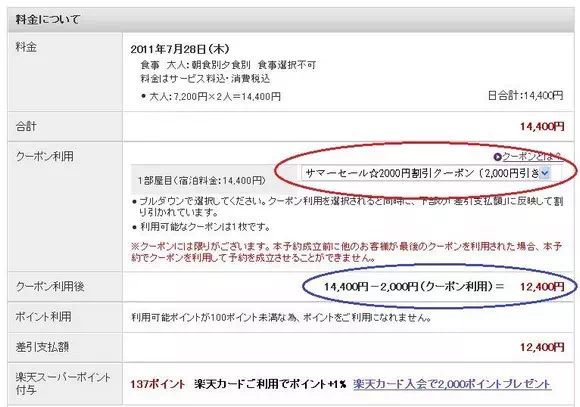
4. Apply discount coupons (if available). If you’ve downloaded a coupon and your booking qualifies, you can apply it here. In this example, a ¥2,000 coupon reduces the total from ¥14,400 to ¥12,400.

5. Use Rakuten Points (if available). If your membership account has Rakuten Points, you can use them to offset the room rate. Points must be used in multiples of 100. After entering the points, click the “決定” button to calculate the remaining balance. Points are deducted immediately upon booking but refunded if the booking is canceled.

The “決済” section in each plan shows the accepted payment methods, which may vary. Common options include オンラインカード決済 (online credit card payment) and 現地払い (payment at the hotel).
6. Select the payment method (支払い方法) and payer (支払う者). Payment options are “現地払い” (pay at the hotel) or “オンラインカード決済” (online credit card payment). For the payer, select “予約者本人” if the cardholder is the same as the account holder, or “予約者以外” if different.

“現地払い” means paying at the hotel during check-in (for ryokan, payment is usually at check-out). No payment or credit card details are required at the time of booking. Payment can be made in cash or by credit card at the front desk, depending on the hotel’s policy (check the hotel’s information page for accepted cards).
“オンラインカード決済” charges your credit card immediately after booking. This method is common for advance booking offers, but many such offers are non-refundable. Check the cancellation policy for terms like 変更・キャンセル不可 (no changes or cancellations). If the plan only accepts online credit card payment, this will be the only option.

【Tip】: Paying at the hotel is a major advantage of Japanese booking sites, so many travelers choose “現地払い.” Even though no payment is made upfront, always cancel properly if needed to avoid penalties. (See the ‘Cancellation‘ section for steps.)
【Tip】: If you initially chose “現地払い” but later want to pay online, log in to your membership account, locate the booking, and change the payment method to “オンラインカード決済.” Click the red button indicated in the image below, re-enter your login details, and proceed with payment.

【Tip】: Some hotels allow special requests in the “備考” field. This is usually optional, but some hotels may require details like your transportation method.

7. After verifying all details, click the red button at the bottom of the page to confirm the booking.

Clicking the button completes the booking process.

8. After booking, a confirmation email will be sent to the email address linked to your membership account (for members) or the email provided during booking (for non-members). To send the email to another address, enter it here and click the “宿泊予約確認メールを送信” button.


The booking confirmation email serves as proof of reservation. You can print it (the first page is sufficient) and present it at check-in, or simply show a screenshot of the email on your phone.

【Tip】: If you accidentally delete the email, you can resend it from your account’s booking history.


【Tip】: After booking, some hotels may send a courtesy email thanking you for your reservation. Others may confirm details like dinner times or pickup arrangements.
【Tip】: Seven days before check-in, you may receive a “七日前予約確認メール” email reminding you of your booking. If your plans haven’t changed, ignore it. Otherwise, cancel promptly.
【Booking Status】: In your account, the booking status will show as “予約完了” (booking complete but pending hotel confirmation) or “予約完了(宿泊施設確認済)” (confirmed by the hotel).
Obtaining a Payment Receipt
If you paid at the hotel, you’ll receive a receipt upon payment. For online credit card payments, you can request a receipt from Rakuten Travel as follows:
1. After completing your stay, log in to your membership account and go to your booking history (予約の確認・キャンセル). Under the “過去の予約” tab, click the “領収書発行” button for bookings paid online.

2. In the “宛名” field, enter the recipient’s name (your name for personal records or a company name for reimbursement).

3. After confirming the recipient, click the “領収書発行” button to generate the receipt.

Note: To include the hotel’s address and plan details on the receipt, check the “宿泊設施の住所を領収書に記載…” box.
Receipt Example

6. Canceling a Reservation
One of the advantages of using Japanese hotel booking sites is that no payment or credit card details are required at the time of booking. This provides peace of mind, as there’s no need to worry about complications if your travel plans change and you need to cancel later.
However, it’s important to note that even if no payment or credit card information was provided during booking, you must still complete the cancellation process if you no longer need the reservation. Canceling is straightforward—here’s how to do it.
1. How to Cancel a Reservation Made as a Rakuten Member
1. On the homepage, click the “予約の確認・キャンセル” link at the top to access the “mytravel” page.
If you’re not logged in, the system will redirect you to the login page.

2. Click the “現在の予約” tab to view confirmed reservations. Locate the reservation you wish to cancel, then click the “キャンセル” button on the right side of the reservation record.

【Tip】: The reservation record displays key details such as check-in date (宿泊日), guest name (宿泊者), reservation number (予約番號), and total cost. The “予約狀況” field indicates the reservation status: “予約完了” means the booking is confirmed, while “予約受付處理中” means it’s still pending.
3. In the text field, enter the reason for cancellation. You can simply copy the provided example: “予定が変わった” (plans have changed). Finally, click the “一室キャンセル” button to confirm cancellation.


4. If you’d like Rakuten to send a cancellation confirmation email to the address registered with your account, click the “キャンセル確認メールの送信” button. This step is usually optional.

5. After cancellation, you can check the canceled reservation under the “過去の予約” tab on the “mytravel” page. If the “予約状況” shows “キャンセル完了“, the cancellation is complete. If it also displays “宿泊施設確認済“, it means the hotel has confirmed the cancellation.

How to Pay Cancellation Fees?
Each hotel sets its own cancellation policy, specifying the free cancellation period and penalties for cancellations beyond that period. Policies vary by hotel and can be found in the detailed information on the hotel’s webpage or in the booking confirmation email, as shown below.

| 連絡なしの不泊:宿泊料金の100% | No-show without cancellation: 100% of the room rate will be charged. |
| 当日 :宿泊料金の80% | Cancellation on the check-in date: 80% of the room rate will be charged. |
| 前日 :宿泊料金の20% | Cancellation one day before check-in: 20% of the room rate will be charged. |
For example, if the check-in date is May 20th, canceling on May 20th incurs an 80% penalty, canceling on May 19th incurs a 20% penalty, and canceling on May 18th or earlier incurs no penalty.
Previously, even if the free cancellation period had passed, the system did not require payment of cancellation fees when canceling online. However, this has changed. Now, if the free cancellation period has expired, the system will require credit card payment of the cancellation fee before completing the cancellation.
If a cancellation fee applies, clicking the “キャンセル” button in the “mytravel” page will redirect you to the payment page (note: login with your ID and password is required).

(1) Pay cancellation fee by credit card
(2) Pay cancellation fee at the hotel
(3) Click here to confirm cancellation
There are two ways to pay the cancellation fee: online with a credit card or in person at the hotel. If you won’t be visiting the hotel, it’s best to pay the fee online. Rakuten Super Points can also be used to offset the fee. For a receipt, follow the method described in the previous section on bookings.
2. How to Cancel a Reservation Made as a Non-Member
1. On the homepage, click the “予約の確認・キャンセル” link at the top.
2. The system will redirect you to the login page. Click the “次へ” button under “楽天会員IDを使わずに予約をされた方はこちら” (Note: The non-member cancellation link is now located at the bottom of the pop-up window).

3. On the following page, enter the “予約受付番号” (reservation number) and “確認キー” (confirmation key), then click “次へ” to proceed with cancellation. (Note: These details can be found in the booking confirmation email.)

Related posts:
- Japan Rakuten car rental tutorials and the latest car rental discounts
- Japan Accommodation Tax: Which Cities Levy It? Who Needs to Pay? How to Pay?
- Tateyama Kurobe Opening Dates, Transportation, Attractions, Luggage Delivery, and Travel Guide
- Guide to Purchasing Tateyama Kurobe Tickets, Train Tickets, JR Passes, and Booking Ride Times
- Tateyama Kurobe Snow Otani: Opening Hours, Snow Wall Height, and Travel Guide
- Tateyama Kurobe Travel Guide: One-Day Itinerary and Recommended Routes (JR and Self-Driving)
- Alpine-Takayama-Matsumoto Area Tourist Pass: Purchase, Exchange, Usage, and Riding Guide
- Japan Universal Studios Tickets, Fast Pass, VIP Tour: Official Website Purchase Guide
- Osaka Mint Bureau Sakura Avenue Reservation Guide
- Japan Kyushu Kawachi Fujien: 2025 Wisteria Blooming Season, How to Purchase Tickets, and Transportation Guide
- Korea Electronic Arrival Card “e-Arrival Card” Detailed Guide
- UK ETA Application:A Step by Step Tutorial
- How to get and use the 10% Agoda Discount Code